





New Coach Viewer App - Get it FREE Now!
Rebuilt from the ground up for iPhone, iPad, Android, Windows and Mac, with page text translation and read aloud in 50+ languages.


Or open the Web Version
Works in any browser on phone, tablet and computer. Same login, same library.

No download needed? Use the Web Version in any browser, including Chromebook.
 Get it Now


Or open the Web Version
Works in any browser on phone, tablet and computer. Same login, same library.
Add to Your Library
Coaching eBooks and video courses from elite coaches and academies. Every title appears in your Coach Viewer library as soon as you log in.
What You Get
- 1,000+ free drills, tactics & sessions
- Learn from the best coaches / teams
- eBooks & Videos - View offline
- Translate & Read Aloud - 50+ languages
- My Collections - plan your sessions
- Print pages to paper - take to practice


Read eBooks Aloud and Translate
50+ Languages
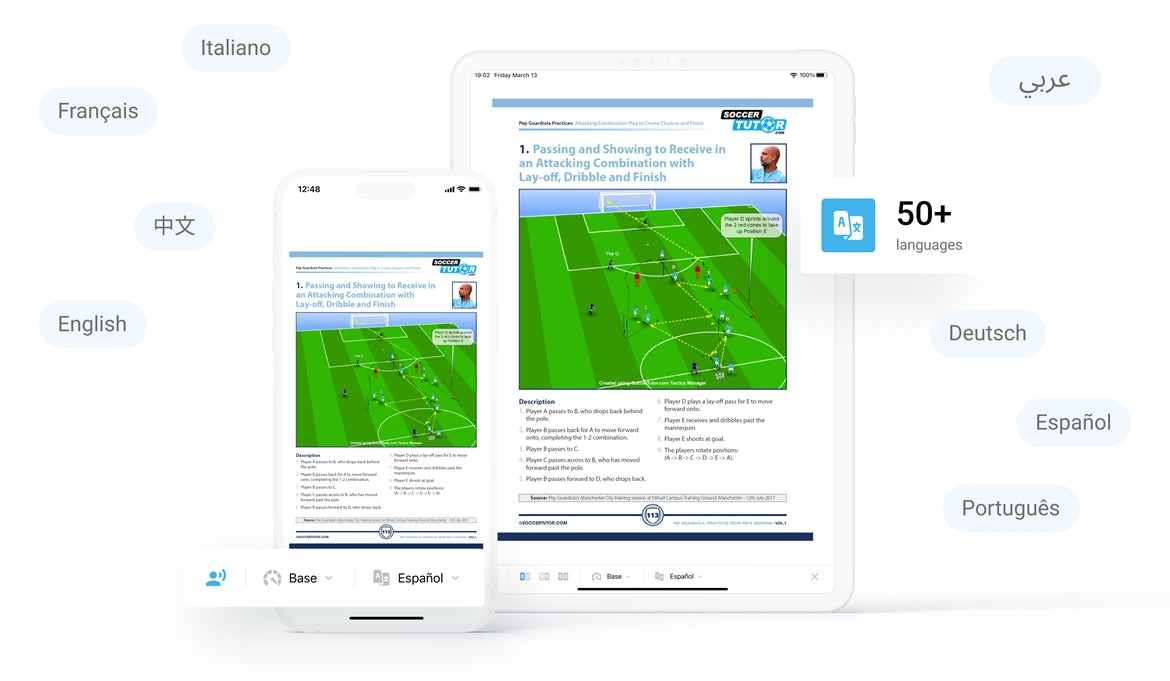
Translate page text and hear it read aloud in your language. Available on:
iPhone / iPad
Android
Windows
Mac
0
+
Coaching Books
In Multiple Languages
0
+
Coaches Worldwide
Using Coach Viewer
0
+
Tactics & Practices
0
+
FREE Tactics & Practices
Who is Coach Viewer Apps for?
Youth, School & Academy Coaches (U5-18)
- World leading Spanish, Dutch, Italian academies
- Technical and Tactical Practices/Sessions
- More topics: Scanning, Combination Play, etc...
Fitness Conditioning Coaches (U9 - Pro)
- Fitness, Strength, Endurance, Periodization
- Speed, Agility, Coordination, Technical, Tactical
- Practices With and Without a Ball
Semi-Pro & Pro Coaches (18+ - Pro)
- Tactical Analysis of World's Top Teams
- Practices from Top Coaches e.g. Pep Guardiola
- Topics: Scanning, Periodization, Transitions, etc...
Goalkeeper Coaches (U9 - Pro)
- Proven Drills to Develop Goalkeepers
- Coaches - Learn How to Coach Goalkeepers
- Individual, Small Group and Team Practices



FAQ
What is the Coach Viewer App?
The Coach Viewer App lets football coaches read eBooks, watch coaching videos, and access 1,000+ free practices and tactics, on any device.
Do you offer free practices?
Yes.
Coach Viewer includes 1,000+ free practices and tactics from top coaches.
Download the app and register, then go to Titles > eBooks and tap the blue Free Sample button on any title.
Coach Viewer includes 1,000+ free practices and tactics from top coaches.
Download the app and register, then go to Titles > eBooks and tap the blue Free Sample button on any title.
Do I need to buy anything to use Coach Viewer?
No.
You can download the Coach Viewer App for free and access 1,000+ free practices and tactics.
If you purchase an eBook or video from SoccerTutor.com, it will appear automatically in the app after login.
You can download the Coach Viewer App for free and access 1,000+ free practices and tactics.
If you purchase an eBook or video from SoccerTutor.com, it will appear automatically in the app after login.
What devices does Coach Viewer work on?
Coach Viewer is available on:
• iPhone and iPad (App Store)
• Android phone and tablet (Google Play)
• Windows PC (Microsoft Store)
• Mac (Mac App Store)
• Chromebook (Google Play, or use the Web version)
• Web version: any browser
One account works on every device, with the same login.
• iPhone and iPad (App Store)
• Android phone and tablet (Google Play)
• Windows PC (Microsoft Store)
• Mac (Mac App Store)
• Chromebook (Google Play, or use the Web version)
• Web version: any browser
One account works on every device, with the same login.
Seeing an error message, or eBooks stuck on “Loading”?
We have launched brand new Coach Viewer apps. The old app no longer works, so please delete it and install the new one.
Android phones, tablets and Chromebooks: updating the app is not enough. Please delete it and install it again.
1. Delete (uninstall) the Coach Viewer app from your device
2. Install Coach Viewer again from the App Store or Google Play
3. Log in with your usual email and password
4. Go to My Library and download your eBooks and videos again
Your purchases are safe. They are stored in your account, not on your device.
How do I read my eBook or watch my videos?
eBooks and videos are not downloaded as PDF files. They are accessed inside the Coach Viewer App.
1. Install Coach Viewer on iPhone, iPad, Android, Windows or Mac, or open the Web version
2. Check your access email after purchase
3. Log in with the email you used at checkout. Your titles appear in My Library
4. Download inside the app for offline use (not available in the Web version)
1. Install Coach Viewer on iPhone, iPad, Android, Windows or Mac, or open the Web version
2. Check your access email after purchase
3. Log in with the email you used at checkout. Your titles appear in My Library
4. Download inside the app for offline use (not available in the Web version)
Can I download the eBooks as PDF?
No.
eBooks are only available inside the Coach Viewer App. This protects the authors' work and gives you features PDFs can't, such as translation, Read Aloud, My Collections and offline reading.
eBooks are only available inside the Coach Viewer App. This protects the authors' work and gives you features PDFs can't, such as translation, Read Aloud, My Collections and offline reading.
I can’t log in to the Coach Viewer App
Coach Viewer uses the same login as Tactics Manager. If you have just made a purchase, your login details have been sent to you by email.
Your SoccerTutor.com shop account doesn't use a password, so please use the Coach Viewer login from your email.
Forgot your password? Tap Forgot Password on the login screen and you'll receive an email to set a new password.
If you see an error message when you open the app, delete it and install the new Coach Viewer app from the App Store or Google Play.
My eBook or video is not appearing
This is usually caused by logging in with a different email.
Please log in with the same email address you used at checkout. If you purchased with a different email address, a new account is created, so please contact us and we will correct this.
Please log in with the same email address you used at checkout. If you purchased with a different email address, a new account is created, so please contact us and we will correct this.
Can I read eBooks and watch videos offline?
Yes.
Once downloaded in the Coach Viewer App, eBooks and videos can be used without an internet connection.
The Web version needs an internet connection, and videos can only be streamed.
Once downloaded in the Coach Viewer App, eBooks and videos can be used without an internet connection.
The Web version needs an internet connection, and videos can only be streamed.
Can I print pages from the eBooks?
Yes.
In the iPhone, iPad, Android, Windows and Mac apps you can print up to 5 pages at a time.
Printing is not available in the Web version.
In the iPhone, iPad, Android, Windows and Mac apps you can print up to 5 pages at a time.
Printing is not available in the Web version.
Can I translate the eBooks?
Yes, into 50+ languages. There are 2 ways to translate:
1. Translate page text: see the text on any page in your language
2. Read Aloud and translate: hear any page read aloud in your language
Both are available on iPhone, iPad, Android, Windows, Mac and the Web version.
1. Translate page text: see the text on any page in your language
2. Read Aloud and translate: hear any page read aloud in your language
Both are available on iPhone, iPad, Android, Windows, Mac and the Web version.


