





iPhone, iPad and Android apps: new versions coming Tuesday 3 November
Our old iPhone, iPad, Android and Chromebook apps are currently unavailable. New, improved apps will be released by Tuesday 3 November.
In the meantime, use Coach Viewer Web in the browser on any phone, tablet or computer, or download the Windows or Mac app. Same login, same library.
New Coach Viewer for Windows, Mac and Web - Get it FREE Now!
Now faster, easier to use with page text translation. New iPhone, iPad and Android apps coming 3 Nov.


Open Web Version
Works in any browser on phone, tablet and computer. No download needed.

WebAny device, any browser

Phone & TabletNew apps coming 3 Nov
Until then, use the Web Version on your phone or tablet.What You Get
- 1,000+ free drills, tactics & sessions
- Learn from the best coaches / teams
- eBooks & Videos - View offline
- All coaching levels, from youth to pro
- Translate & Read Aloud - 50+ languages
- Print pages to paper - take to practice
Read eBooks Aloud and Translate
50+ Languages
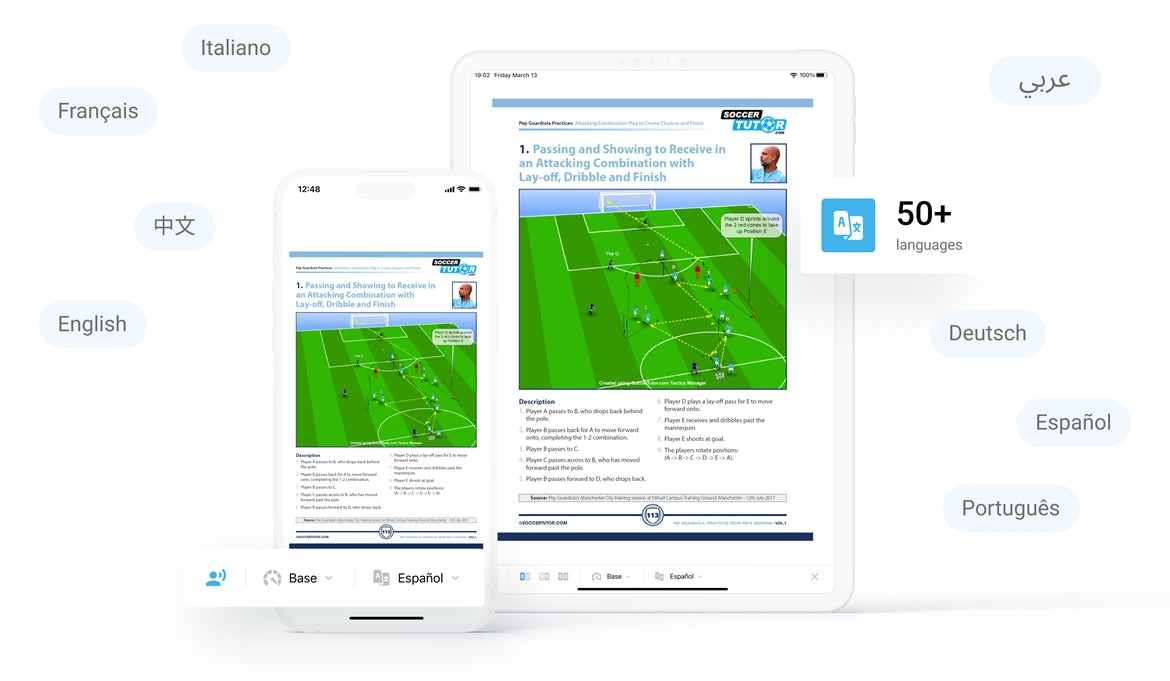
Translate page text into your language. Available on:
 Windows
 Mac
iPhone / iPad
 Android
New iPhone, iPad and Android apps coming Tuesday 3 November.
0
+
Coaching Books
In Multiple Languages
0
+
Coaches Worldwide
Using Coach Viewer
0
+
Tactics & Practices
0
+
FREE Tactics & Practices
Who is Coach Viewer Apps for?
Youth, School & Academy Coaches (U5-18)
- World leading Spanish, Dutch, Italian academies
- Technical and Tactical Practices/Sessions
- More topics: Scanning, Combination Play, etc...
Fitness Conditioning Coaches (U9 - Pro)
- Fitness, Strength, Endurance, Periodization
- Speed, Agility, Coordination, Technical, Tactical
- Practices With and Without a Ball
Semi-Pro & Pro Coaches (18+ - Pro)
- Tactical Analysis of World's Top Teams
- Practices from Top Coaches e.g. Pep Guardiola
- Topics: Scanning, Periodization, Transitions, etc...
Goalkeeper Coaches (U9 - Pro)
- Proven Drills to Develop Goalkeepers
- Coaches - Learn How to Coach Goalkeepers
- Individual, Small Group and Team Practices




FAQ
Why can't I use the iPhone, iPad or Android app right now?
The old phone and tablet apps are no longer available. New, improved iPhone, iPad and Android apps will be released by Tuesday 3 November.
Until then, use the Coach Viewer Web version in the browser on your phone or tablet. Same login, same library.
Until then, use the Coach Viewer Web version in the browser on your phone or tablet. Same login, same library.
What is the Coach Viewer App?
The Coach Viewer App lets football coaches read eBooks, watch coaching videos, and access 1,000+ free practices and tactics — all on any device, online or offline.
Do you offer free practices?
Yes.
Coach Viewer includes 1,000+ free practices and tactics from top coaches.
Download the app → Register → Open Free Samples
Do I need to buy anything to use Coach Viewer?
No.
You can download the Coach Viewer App for free and access 1,000+ free practices and tactics.
If you purchase an eBook or video from SoccerTutor.com, it will appear automatically in the app after login.
What devices does Coach Viewer work on?
Coach Viewer is available on:
• Windows PC
• Mac
• Web version: any phone, tablet, laptop or Chromebook in a browser
• iPhone, iPad and Android: new apps coming Tuesday 3 November
• Windows PC
• Mac
• Web version: any phone, tablet, laptop or Chromebook in a browser
• iPhone, iPad and Android: new apps coming Tuesday 3 November
How do I read my eBook or watch my videos?
eBooks and videos are not downloaded as PDF files. They are accessed inside the Coach Viewer App.
1. Open the Coach Viewer Web version, or install the Windows or Mac app
2. Check your access email after purchase
3. Log in with the email you used at checkout. Your titles appear in My Library
4. Download inside the app for offline use
1. Open the Coach Viewer Web version, or install the Windows or Mac app
2. Check your access email after purchase
3. Log in with the email you used at checkout. Your titles appear in My Library
4. Download inside the app for offline use
Can I download the eBooks as PDF?
No.
eBooks are accessed exclusively through the Coach Viewer App.
This allows bookmarks, notes, translations, Read Aloud, synced progress, and offline access — features PDFs don’t support.
I can’t log in to the Coach Viewer App
1. Wrong password — tap Forgot Password
2. Wrong email — use the email used at checkout
2. Wrong email — use the email used at checkout
My eBook or video is not appearing
This is usually caused by logging in with the wrong email.
• Use the same email address used at checkout
• Go to My Library → Refresh / Restore Purchases
• Use the same email address used at checkout
• Go to My Library → Refresh / Restore Purchases
Can I read eBooks and watch videos offline?
Yes.
Once downloaded in the Coach Viewer App, eBooks and videos can be used without an internet connection.
Can I print pages from the eBooks?
Yes.
On Windows and Mac you can print up to 5 pages at a time. On other devices you can print one page at a time.
On Windows and Mac you can print up to 5 pages at a time. On other devices you can print one page at a time.
Can I translate the eBooks?
Yes, into 50+ languages.
Page text translation is available on Windows and Mac, and in the new iPhone, iPad and Android apps. Read Aloud and translate works on all devices.
Page text translation is available on Windows and Mac, and in the new iPhone, iPad and Android apps. Read Aloud and translate works on all devices.
What are the benefits of using the Coach Viewer App?
• Read & watch on all devices
• Offline access
• Translate eBooks into multiple languages
• Read Aloud
• Bookmarks synced across devices
• Notes & session planning
• Print pages to take to training
• Manage devices easily
• 1,000+ free practices and tactics included
• Offline access
• Translate eBooks into multiple languages
• Read Aloud
• Bookmarks synced across devices
• Notes & session planning
• Print pages to take to training
• Manage devices easily
• 1,000+ free practices and tactics included


